Data Agents in MS Fabric
Find out how Microsoft Fabric Data Agents work and how they translate your natural language questions into SQL, DAX and KQL queries
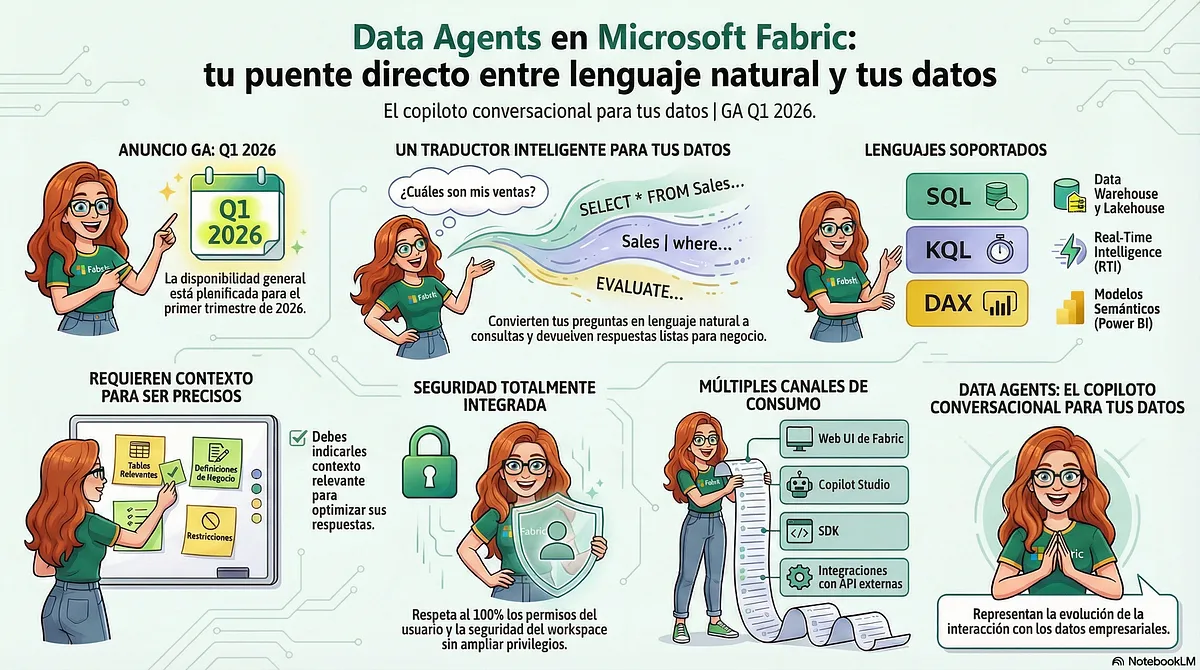
When we hear about “conversational AI” tools for data, we usually picture a simple chat box where we ask questions and get answers. It’s a powerful idea, no doubt. We’ve been saying for years that “we want the business to be able to ask the data questions directly, without going through the analysts”. And for years, the real answer has been something like:
“Sure, but open a Jira ticket and we’ll see how to build the report in two sprints.”
With Microsoft Fabric Data Agents (CAREFUL! they’re in preview until Q1 2026), we finally have something that starts to answer that need.
What Microsoft Fabric Data Agents are and how they work
Fabric Data Agents are much more than a Q&A interface. They’re a new kind of data artifact that, in essence, behaves like a translator between people and data:
On one side, it understands natural language questions. On the other, it generates and runs structured queries against your data sources:
- SQL for Lakehouse and Warehouse (NL2SQL).
- DAX for Power BI semantic models (NL2DAX).
- KQL for Kusto databases (NL2KQL).
But with one important difference: it doesn’t (or shouldn’t) just make things up. Because it’s heavily conditioned by:
- The real schema of your data in OneLake.
- The business instructions you give it.
- The example queries you use to train how you want it to reason.
And all of this is packaged in an independent artifact inside Fabric. A Data Agent is created, versioned, published, deployed and shared like any other Fabric item.
Data Agent vs Copilot: aren’t they the same?
Spoiler: no.
The first and most important difference is that a Data Agent isn’t a preconfigured experience like the copilots built into Fabric. It’s an independent, reusable and portable artifact that you control. While Fabric copilots are embedded assistants designed for specific tasks inside an application, a Data Agent is a standalone asset you build for a defined business purpose.
They share the underlying technology (LLMs + Fabric), but they’re meant for different roles and scenarios.
How a Data Agent translates natural language questions into SQL/DAX/KQL queries
When someone asks a question, the flow it follows (simplified) looks something like this:
💬 It interprets the question. The AI model tries to understand which metric is being asked for, which time or segment filters apply, and which entities and tables it refers to.
🎯 It picks the right source. Based on:
- The agent instructions we’ve given it.
- The data source instructions you’ve configured (Lakehouse, Warehouse, KQL).
🧠 It generates the structured query
- SQL if it’s against a Lakehouse/Warehouse.
- DAX if it’s against a semantic model.
- KQL if it’s against a Kusto database.
⚙️ It runs the query and builds the answer. Returning:
- The numeric or tabular result.
- A natural language summary.
- And, very importantly, the generated query and the intermediate steps it followed while you’re testing it.
That transparency isn’t a minor detail: it’s what lets you debug the agent, trust what it does and turn it into a real working tool instead of a black box.
How to make your Data Agent actually work
Building a data agent is like training a new junior analyst. Giving them access to the file folders isn’t enough. You need to give them an employee handbook explaining the business rules and the company vocabulary. They’ll also learn much faster if you show them concrete examples from previous reports (“when they ask you for X, calculate Y this way”). Finally, you don’t leave them working alone with the client until you’ve supervised their first tasks and corrected their mistakes.
💻 Make sure we have everything we need
You need a paid Fabric capacity (F2 or higher), and a tenant admin needs to have enabled the Data Agents, Copilot and Azure OpenAI options in the admin portal. You also have to allow cross-region processing for the AI part. Without that, the agent won’t even start.
🤖✨ Create the agent
From your workspace: New → Fabric data agent. Give it a decent name and start connecting data to it.
📚🔍 Choose your sources and tables carefully
You can add up to five sources (Lakehouse, Warehouse, KQL, semantic models). The trick is not to throw everything in “just in case”. Connect only the relevant tables and make sure they have names a reasonable human can understand (e.g. CustomerEmail instead of col1), since that helps the AI understand better.
🎛️ Configure its behaviour
This is where you really “train the junior”.
You tell it what its goal is, which tone to use and which business rules to follow.
And, for each data source, you can explain how tables relate, which columns to use for certain filters or how to interpret internal acronyms. Anything that isn’t here… it may make up.
🧪📘 Teach it with examples (Few-Shot Learning)
With Few-Shot Learning you can add question → expected query pairs. It’s the fastest way for it to learn complex logic or odd cases. (On semantic models, no examples for now. Preview things.)
🔁🧷 Test, fix, repeat
You ask it questions, review the SQL/DAX/KQL statement it generates and adjust wherever it fails: unclear instructions, a weird schema, not enough examples… It’s a continuous improvement cycle, like any serious Fabric artifact.
🚀📢 Publish and share
Once it answers well, you publish it. That creates a stable version for users while you keep iterating on the draft. Add a clear description and review permissions.
🔌🛠️ Integration and maintenance
Once published, you can use it in Copilot for Power BI, Copilot Studio or via API/SDK. If you want to do it properly, connect the workspace to Git to get version control, deployment pipelines and automated tests with a set of questions/answers.
What about security?
A common concern with these tools is security. The good news is that Data Agents don’t create a new access vector; on the contrary, they strictly respect all the data permissions of the user running the query.
- The Fabric data agent respects row-level security (RLS) and column-level security (CLS).
- Data access runs under the user’s Microsoft Entra ID identity and their workspace or data permissions.
- The agent only reads schemas and runs queries (SQL/DAX/KQL) if the user has permission to access that data.
- The queries generated by the data agent are read-only. Operations involving creating, updating or deleting data, or any kind of data change, aren’t allowed, to protect data integrity.
Minimum permissions required on data sources
For a user to successfully query through a Fabric data agent, they must have the minimum required permissions on the underlying data source. If the user doesn’t have enough permissions, queries will throw an authorization error or return empty results.
However, there’s a detail many people miss: for a user to query a Power BI semantic model through a Data Agent, Read permission isn’t enough. They need Build permission. Why? Because the agent doesn’t just read pre-calculated data. It generates and runs new DAX queries against the semantic model in real time, an action that requires Build permission. This is an important technical detail to make sure your users can interact with Power BI models without problems.
Fabric Data Agents represent a paradigm shift. They’re not just a friendlier way to ask about data; they’re customizable, versionable and programmable building blocks for creating data-centric AI solutions. Their real value isn’t in the conversation, but in the configuration, the training and the integration.
And now, here’s the link to the session where Mónica Mesa and I explain this whole spiel in a somewhat more dynamic way. And here’s the link to the slides.
And if you caught the reference hidden in the data… don’t be shy, leave a comment and let’s show off our inner geek a bit. 😉
I hope you enjoy it :)
And remember: Data Agents also consume CUs, so you’ll need to monitor them if you don’t want trouble with your capacity.
References
Found it useful? Clap, no account needed. You can clap more than once.
Comments