Fabric MCP
What the Microsoft Fabric MCP is, how to try it with MCP Inspector and why it stops Copilot from making up parameters and endpoints.
There’s a moment in the life of anyone working with Microsoft Fabric and GitHub Copilot when Copilot decides to get a little too “inspired” and makes up a parameter, a property or an endpoint that doesn’t appear anywhere in the official documentation. And while creativity is wonderful, it’s not so wonderful when it breaks something.
 Image generated with ChatGPT
The problem it came to fix
Fabric is fantastic… but also complex. A huge ecosystem where Lakehouses, semantic models, Pipelines, Notebooks, connections, metadata… all live together, and that’s just on any given Thursday.
If you don’t give it context, an AI agent can only rely on its imagination. And honestly, I prefer my science fiction at the cinema.
The Fabric MCP promises to bring order to the chaos by giving the agent an exact X-ray of the ecosystem. No hunches, no assumptions, no hallucinations. Structured, official, consistent information with no gaps. The agent stops guessing and starts really understanding thanks to all that context.
How an MCP works
At its core, an MCP is organized like a good technical team: each piece does its own job.
MCP servers. They publish all the context: APIs, schemas, artifact definitions, examples, best practices… They’re the librarians of knowledge.
MCP clients. VS Code, Copilot, external agents… They connect to the server and become able to understand Fabric natively. They stop making things up. This could be you going to ask the librarian for a book.
Tools & Actions. The operational part. Before, an agent “suggested”; now it acts with real knowledge following the official APIs. And here we’d have the books, all that knowledge.
 I’ve always loved this film.
MCP Inspector
The MCP Inspector is the screen where you watch this whole exchange of information requests unfold. It will help us get an overview of the different tools and start tinkering with the MCP.
A tool that, the first time you open it, makes you go:
“Oh. OK. Now I get what’s going on under the hood.”
You run it with:
npx @modelcontextprotocol/inspectorIn a few seconds you’ll have a proxy up, a token generated and a URL ready to open the panel.
Connecting your MCP server to MCP Inspector
The first thing you’ll have to do is install the Fabric MCP. Once it’s installed, there are two main ways to get it running:
Mode 1: STDIO (simple and direct) The Inspector launches your MCP server from your Python script. Perfect for early development or quick tests.
Mode 2: Streamable HTTP (pro mode) First you run your MCP server (with Python or the CLI) on http://localhost:8000/mcp, and then the Inspector connects to it as an external client.
The MCP Inspector panels
The Inspector panels are designed for something very specific: watching how your MCP server breathes. That simple. That powerful.
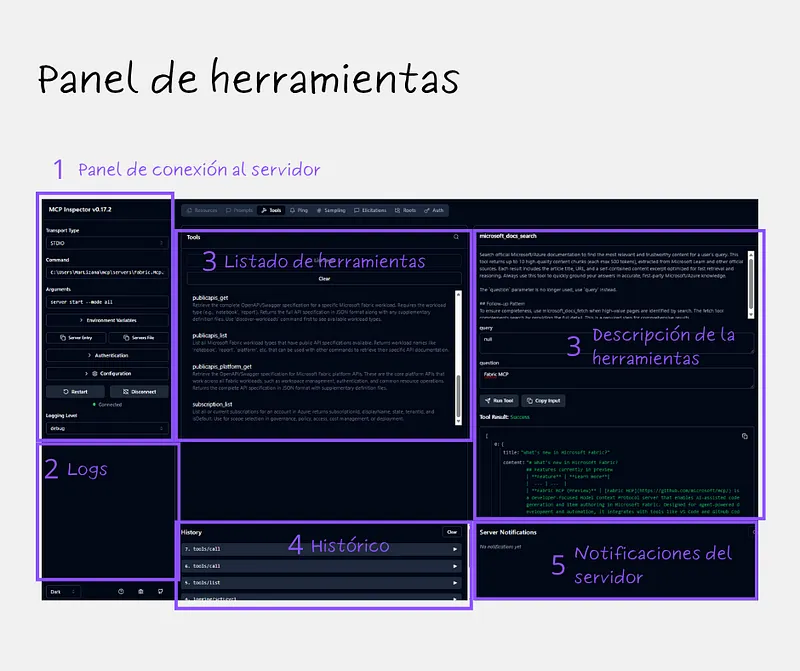 MCP Inspector
- Server Connection. The command centre. Transport, server path, arguments. If something fails here, nothing else starts.
- Logs. The name is misleading, because they’re not just errors: they’re all the server traces in real time. Incoming and outgoing messages, info logs, warnings, errors… Perfect for understanding why an agent says “I can’t see this tool” or “that schema doesn’t exist”.
- Tools. The star of the interface. It’s literally a Postman for MCP. You pick a tool, fill in the parameters, hit Run Tool and see the JSON response. If you want to check how an agent would make that call, this panel is pure gold.
- History. Here you can see every message exchanged between the Inspector and the server. You’ll see what the client sends, what the server returns, how IDs are handled and how the protocol really flows.
- Notifications. When a tool runs long processes and reports progress, all those notifications show up here.
The Fabric MCP tools
The MCP includes a total of 11 tools that let agents work with correct, up-to-date and fully official information.
Think of them as a menu of capabilities that Copilot uses to:
- search the official documentation,
- get full Microsoft Learn pages,
- retrieve real code samples,
- explore Fabric’s public APIs,
- access object definitions and built-in best practices.
Here’s the full table:
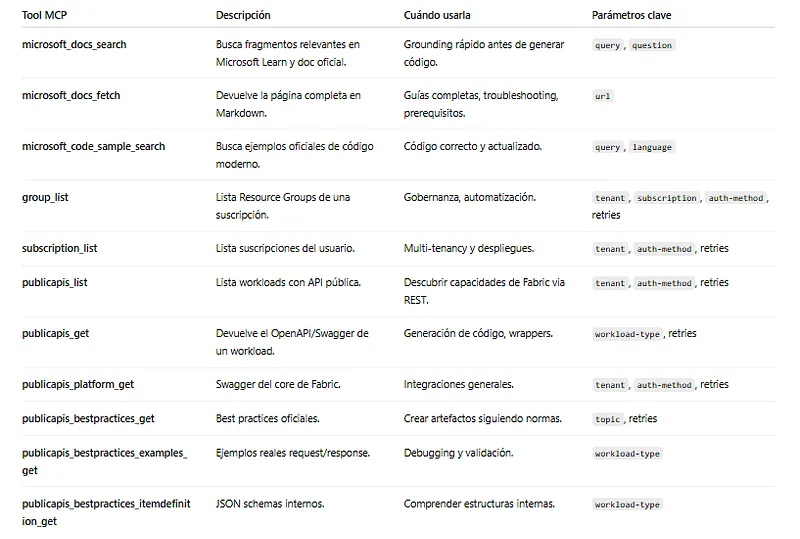 Summary table of the Fabric MCP tools
What the Fabric MCP doesn’t do yet
IMPORTANT! So we don’t confuse a superpower with magic, it’s worth clarifying what the MCP doesn’t do (yet). And it’s not for lack of will, but by design and because it’s still growing.
- It doesn’t run actions in your Fabric environment. The purpose of MCP is to give the agent the perfect context to generate code, but the decision to run it is still 100% yours.
- It doesn’t connect directly to your tenant. Your MCP server lives on your machine. Everything happens locally, keeping your environment safe from “creative experiments”. For now.
- It only offers read access to the APIs. It includes the specifications and the official documentation built in. It’s like having Microsoft Learn embedded, ready for an agent to read, without needing to connect to anything live.
And since this is a young but very promising technology, some pieces are still evolving. Today the Fabric MCP focuses on context, not execution. The final click is still yours. And honestly, that’s exactly what lets an agent be useful without breaking anything along the way.
What’s next? Start tinkering with the new Power BI MCP that was announced this week.
I’ll also leave you the link to the GitHub repository by Luis Mañez, with whom I gave a talk about this at Netcoreconf on 14 November.
Bibliography
MCP Inspector — Model Context Protocol
Inspector — Official MCP documentation in Spanish
modelcontextprotocol/inspector: Visual testing tool for MCP servers
https://www.youtube.com/watch?v=Y0tZ35dFFx4
Introducing Fabric MCP (Preview) | Microsoft Fabric Blog | Microsoft Fabric
mcp/servers/Fabric.Mcp.Server at main · microsoft/mcp
Found it useful? Clap, no account needed. You can clap more than once.
Comments