🐙GitHub — Actions and branch protection rules
Already mastered the PowerShell scripts from the first chapter? Time to deploy them on GitHub with Actions and branch protection rules.
Have you mastered the PowerShell scripts we saw in the first chapter? If you’ve already forged your PowerShell scripts to defend quality in Microsoft Fabric, it’s time to deploy them on the 🐙 GitHub battlefield. In this chapter, we’ll master GitHub Actions and Branch Protection Rules to automate keeping watch over our code.
But first…
 Thanks for the plushie, Manu!!
Our strategy? Turn the main branch into an impregnable fortress🏰: only code that passes every quality test can be merged. For the dev branch, we’ll keep strict control but with ninja agility: errors will be reported clearly, letting the team decide whether to merge under special circumstances, without slowing development down.
🔄 Is your path Azure DevOps? If you prefer that training dojo, we have the sacred scroll for you here. But if you follow the GitHub path, draw your katana and keep reading!
Step 1: Setting up the GitHub Action 📄 build.yml
Our Action 📄build.yml (in 📁.github/workflows/ of your repository) will orchestrate running the PowerShell scripts and keep us informed directly on each Pull Request. Because it lives in a specific path, GitHub Actions will detect it automatically and start running the workflow according to the triggers (on:) you’ve defined.
Key points of this Action:
✨Trigger: it fires on Pull Requests to main and dev (on: pull_request: branches: ...).
🙏Proper permissions (permissions:): grants what’s needed to read code, comment on PRs and update “checks”.
🏋️♀️Organization (Setup folders): prepares the scripts/testResults folder for the scripts’ XML reports.
💪 Execution control: scripts with an id so their result (outcome) can be referenced. continue-on-error: true to make sure every validation runs.
📊 Reports and artifacts: actions/upload-artifact@v4 saves the XML files as artifacts for debugging. EnricoMi/publish-unit-test-result-action@v2 publishes a detailed test report in the PR “checks”.
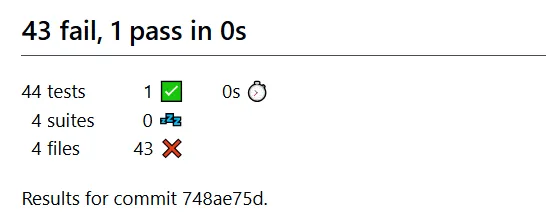
🔮 Clear communication (Comment PR with results): an actions/github-script@v6 script creates or updates a comment on the PR with a ✅/❌ summary of each validation.
🚫 The master clause for main: if any script fails AND the PR targets main, the whole Action is marked as failed (core.setFailed(...)), blocking the merge.
Step 2: Setting up branch protection rules on GitHub
With the Action ready, it’s time to set up the defences.
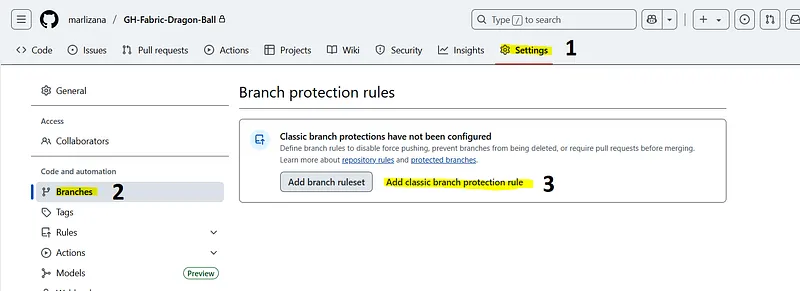
Getting to the 🛡️ protection rules:
- In your GitHub repository, go to ⚙️Settings > Branches.
- Click Add classic branch protection rule.
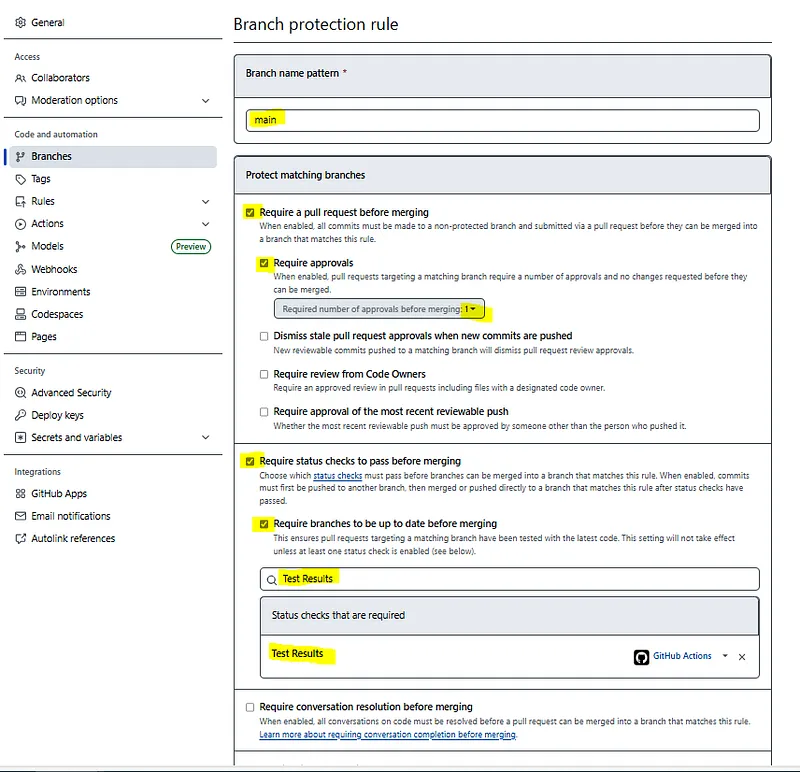
The main branch: absolute defence!
🗣️ Branch name pattern: main.
🤝 Require a pull request before merging: turn it on. 🧑🏫 Require approvals: turn it on (1–2 reviewers).
🔥 Require status checks to pass before merging: essential!
- Turn it on and select your Action job (e.g.
Test Results). If this “check” fails (thanks to ourcore.setFailed), the merge is blocked. - Consider turning on
"Require branches to be up to date before merging".
✅Create. It will probably ask you for your password here.
If we run our Action from dev to main we’ll get something like this:
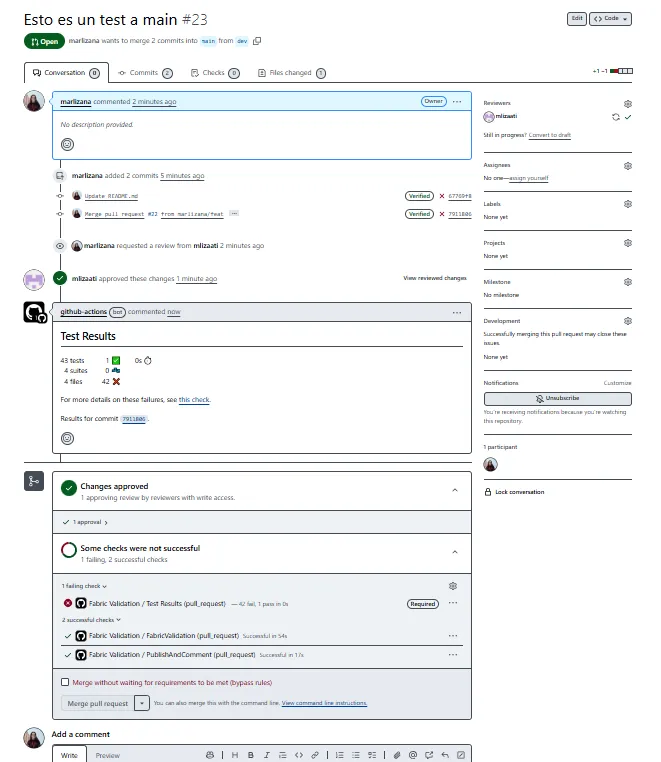
We can see it doesn’t let us merge (the option shows up in light grey) despite having a reviewer’s approval, because the tests came back with errors.
The dev branch: 🧐 Supervision and agility
➕Add rule to add a new rule.
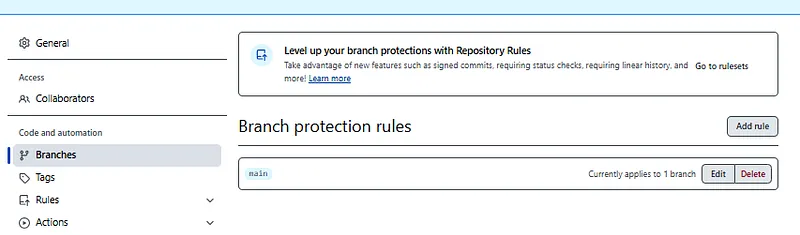
The Action will report errors, but won’t fail on its own if the PR isn’t to main.
🗣️ Branch name pattern: dev.
🤝 Require a pull request before merging: turn it on (you can be more flexible with approvals).
🔥 Require status checks to pass before merging:
- More relaxed option: don’t require the
FabricValidationcheck. The decision to merge lies with the reviewers, based on the comment and the check results.
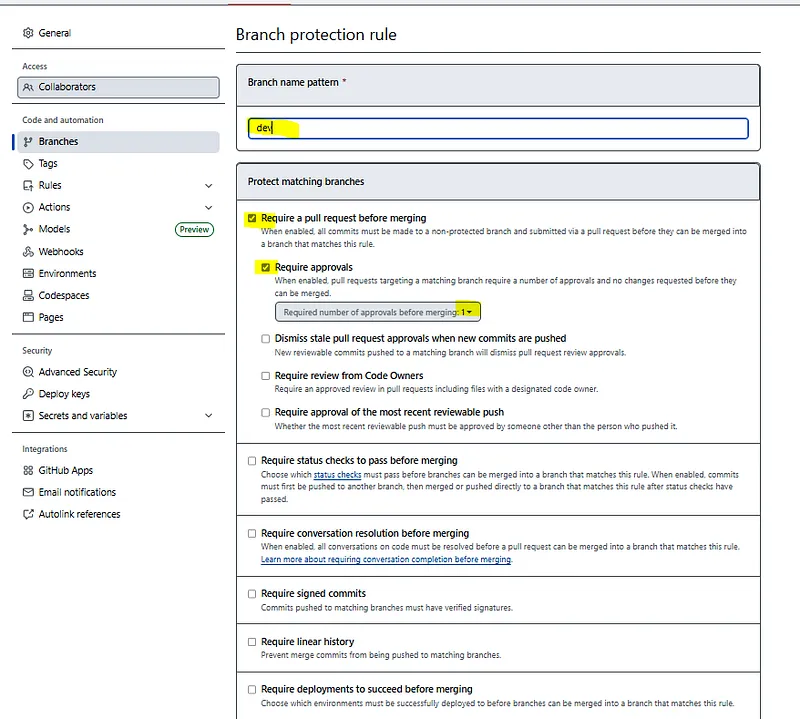
✅ Create.
When we create a Pull Request and everything runs, it will look like this:
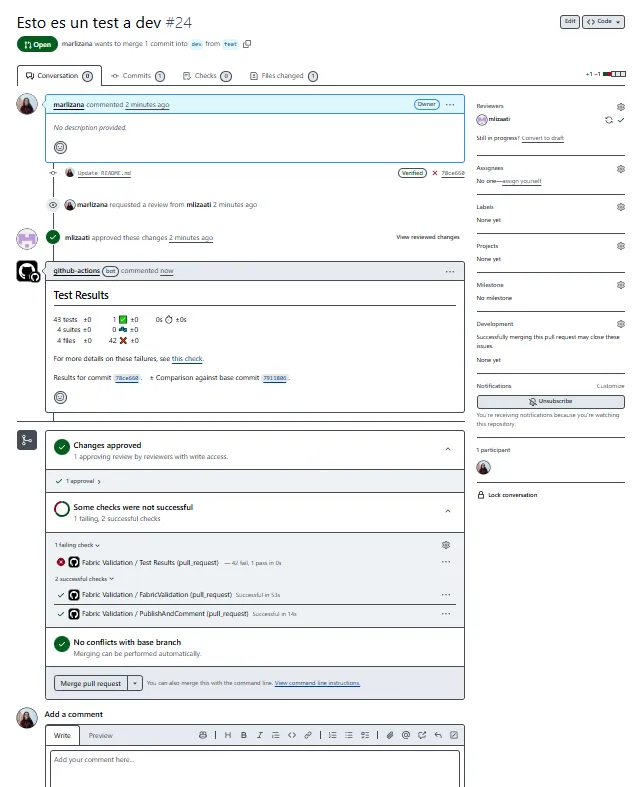
We can see the tests ran and the comments tell us there are errors, but since we have the approval, the Merge pull request option shows up.
🚀 Your quality dojo on GitHub is up and running!
Mission accomplished! 🥳 You’ve set up GitHub Actions and branch protection rules to build a robust CI/CD system tailored to your needs. Your main branch is now protected by an impenetrable quality shield, while dev allows an agile but informed workflow.
With every Pull Request, your scripts will act as sentinels, making sure only the most polished and reliable code moves forward. You’ve raised your development Ki, ready to build legendary data solutions with the confidence that quality has your back! Keep training and improving!
Found it useful? Clap, no account needed. You can clap more than once.
Comments