Liquid Clustering in Fabric: what it is, how to set it up and when to use it
How Liquid Clustering organizes Delta tables in Microsoft Fabric, how it compares to partitioning and Z-Order, and what to check before adding it to your pipeline.
Zygmunt Bauman talked about a “liquid” modernity, where things are no longer meant to stay exactly as they were. And the name Liquid Clustering fits quite well to explain what happens here: the way your data is organized doesn’t have to stay frozen either.
What is Liquid Clustering in Microsoft Fabric?
Liquid Clustering is a physical layout strategy for Delta tables that lets you declare the columns that should be used to organize the data.
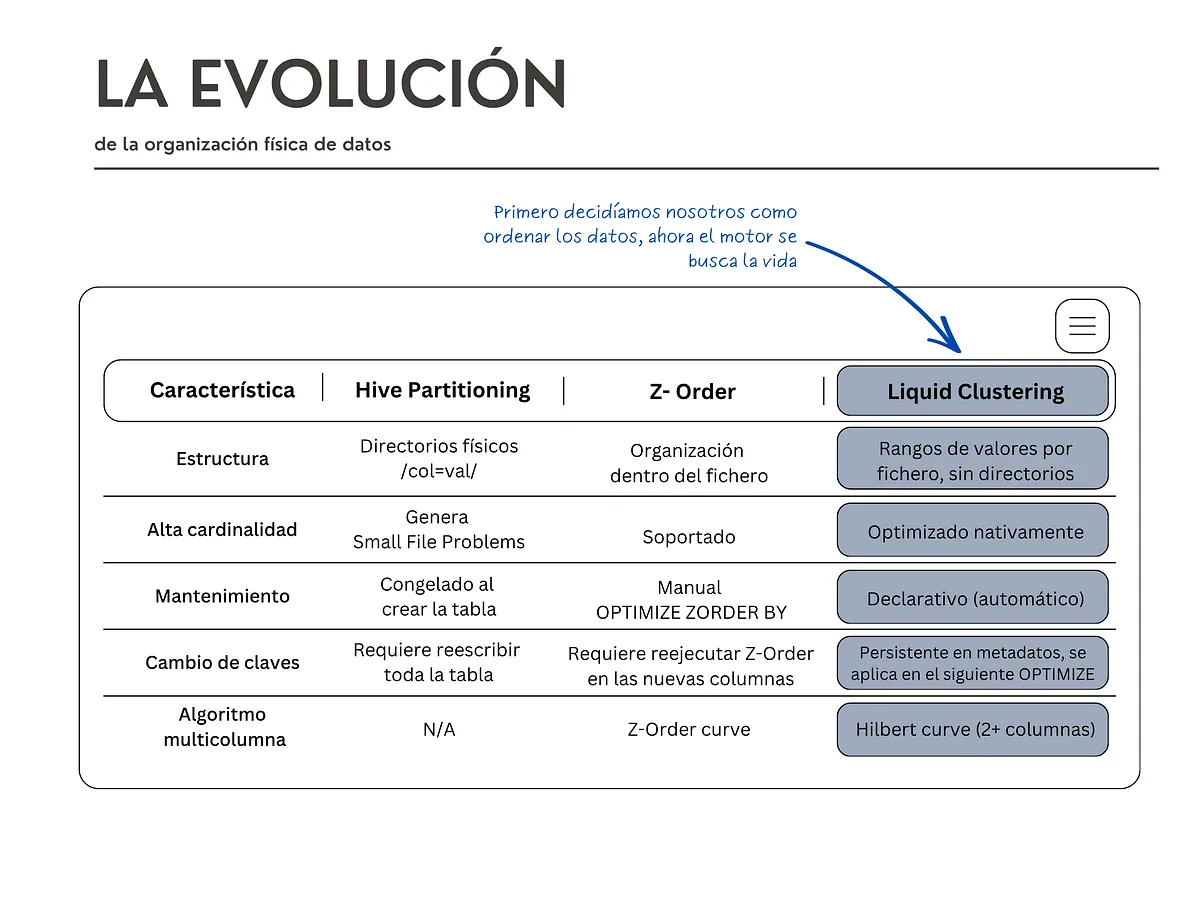
Unlike Hive-style partitioning, it doesn’t create a folder structure for each value. And, unlike Z-Order, you don’t have to specify the columns again every time you run OPTIMIZE.
The clustering definition is stored in the table metadata, and OPTIMIZE uses that information to reorganize the data.
The goal is to improve file skipping: when a query filters by a clustering column, Fabric can discard more files without having to read them.
But before we get there, it’s worth understanding what we’re trying to organize.
If you already know a bit about this, you can skip this section. If Hive-style partitioning, declarative clustering or physical layout sound like gibberish to you, these paragraphs are for you.
What a Delta table looks like inside
If you come from SQL Server, “table” sounds like a compact thing that lives in one place. In a lakehouse, it doesn’t work like that.
A Delta table is lots of Parquet files stored in OneLake, plus a log (the delta log) that records which files make up the current version of the table. When you insert data, nothing existing is modified: new files are written and the log notes that they count now too. A one-year table with daily loads can have a lot of them.
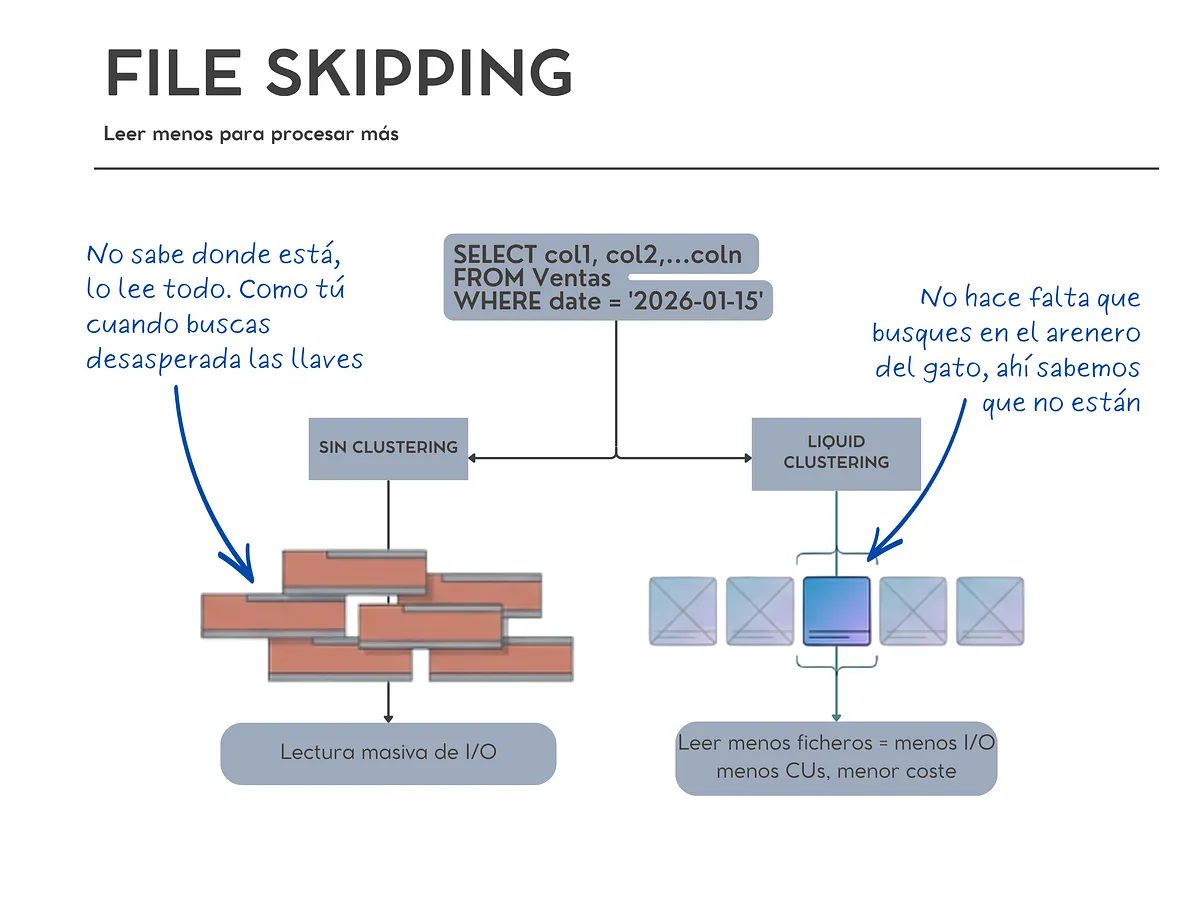
Each file carries a small label saying what it contains: the oldest date, the most recent one, and so on.
 How File Skipping works
When you run WHERE date = '2026-01-15', the engine doesn’t open the thousand files. It first looks at that label and discards every file whose date range doesn’t include that day, skipping files without opening them. This is called file skipping.
What determines how many it can skip is the physical layout: how the rows are spread across files. If January’s sales are scattered across the thousand files, every range includes January and none can be discarded. If they’re concentrated in five, it reads five.
And that reading is what costs money. I/O (input/output) is, oversimplifying a lot, bringing data from storage so it can be processed. And reading data costs: fewer files read usually means less I/O, less time and fewer CUs.
Organizing the physical layout is, basically, deciding which rows end up together in the same file. There are several ways to do it. Let’s look at the three most important ones. Think of them as different ways of organizing a bookshelf.
Static Hive-style partitioning
This is the classic one. You pick a column when you create the table and the system creates one physical folder for each distinct value:
/ventas/region=norte/
/ventas/region=sur/
/ventas/region=este/
You filter by region and the engine goes straight to the folder. Super fast… as long as you filter by region.
It’s called static because the decision gets frozen in the directory structure. Changing the partitioning column means rewriting the whole table, because every file has to move to new folders.
And it has a well-known problem: if you partition by a column with many distinct values (date with time, customer ID, product code), you end up with thousands of folders, each with a tiny file inside. That’s the small file problem, and it makes queries slower, not faster, because opening a thousand 2 MB files costs much more than opening ten 200 MB ones.
The number of distinct values in a column is called cardinality, and it’s the same concept as in your Power BI semantic model. Imagine a table with 500 million sales. If you partition by pais (country) and you have 20 countries, you may end up with a few big folders. If you partition by id_pedido (order ID), which can have hundreds of millions of distinct values, things get pretty ugly: too many folders, too many small files. Partitioning by something with high cardinality… you can see the potential disaster, right?
Z-Order
No folders are created here. Rows are reordered inside the files so that the ones with similar values end up together, making each file’s min/max ranges as narrow as possible.
Z-Order uses a space-filling curve. The name sounds much more complicated than it is. The idea is that data that is close across several columns also ends up physically close.
What for? So that, when you filter by those columns, Fabric can discard more files.
The problem is that it’s manual maintenance. The command is OPTIMIZE ventas ZORDER BY (order_date, region), and that definition isn’t stored anywhere. Every time you run it you have to write the columns again. If six months from now a teammate runs OPTIMIZE with different columns, or none, the layout is undone and nobody notices. There’s no source of truth about how that table should be organized. Only whatever someone typed last time.
What Liquid Clustering is, the new thing in Fabric
Here’s the important difference. Liquid Clustering is declarative: instead of giving the order every time, you declare once how you want the table to be organized and that decision is stored in the metadata. From then on, OPTIMIZE already knows what to do.
It’s the difference between telling someone where to put each thing every time they walk in, and leaving the rule written on the wall.
No physical folders, with columns you can change whenever you want, and no need to rewrite the table to change them. We write down how we want it organized and the house knows how to keep that order.
 Feature comparison by physical data layout
One important thing: you can’t mix everything
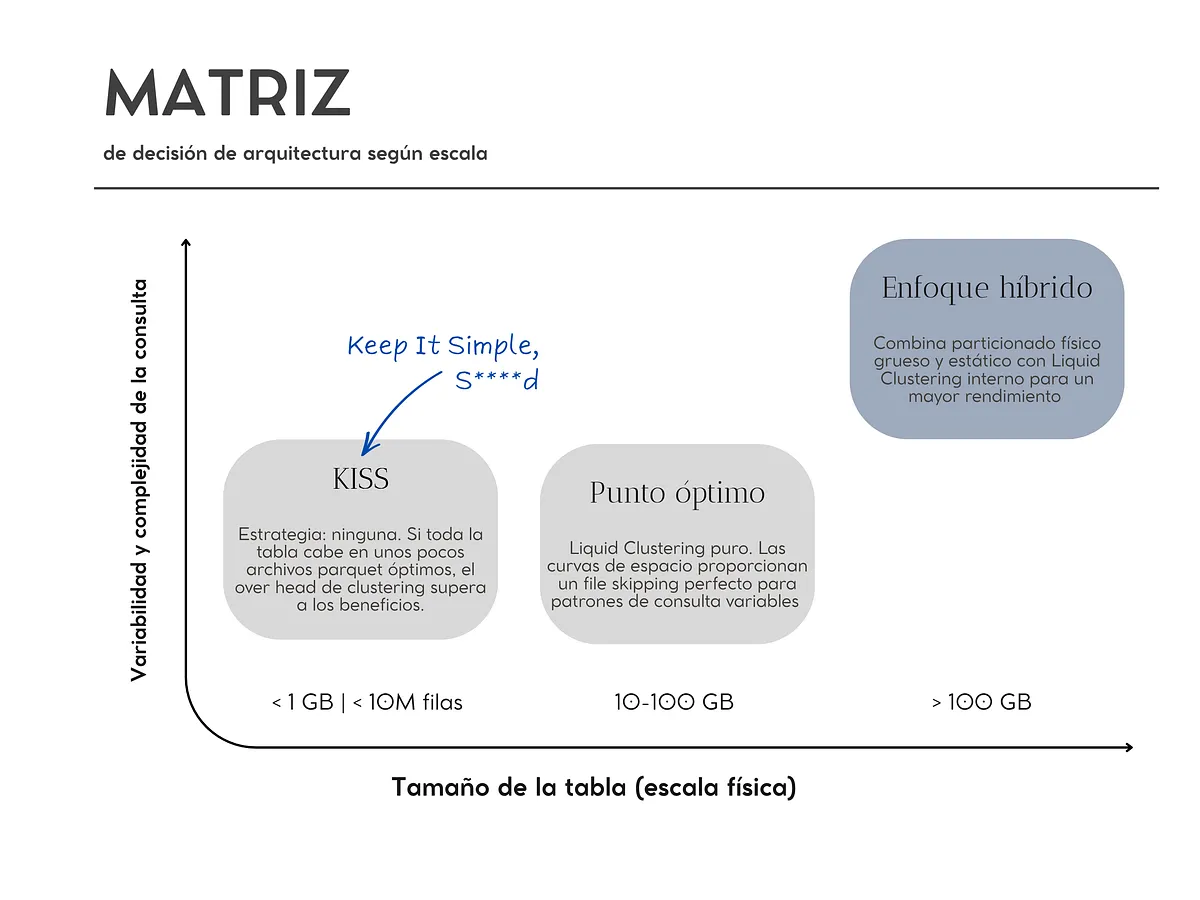
Liquid Clustering and Hive partitioning aren’t two layers you can stack on top of each other. In Fabric, you have to choose one strategy for the table. The simple difference would be:
- Partitioning: physically splits the data and can help when you need to isolate concurrent writes.
- Liquid Clustering: organizes the data mainly to improve reads and file skipping.
So before thinking “how do I combine both?”, the question is rather: what problem am I trying to solve?
Before you start: which Runtime do you have?
There’s a small catch here: Liquid Clustering doesn’t behave exactly the same in every Runtime.
In Fabric:
- Runtime 1.3 → Delta Lake 3.2
- Runtime 2.0 → Delta Lake 4.2
In Runtime 2.0, incremental clustering lets OPTIMIZE reorganize the data progressively without redoing everything every time.
In Runtime 1.3 you can also work with Liquid Clustering, but it has more limitations and the optimization behaves differently.
So, before copying an example from the Internet and thinking Fabric is broken, check which Runtime you’re using first.
Now, let’s declare the clustering
On a new table:
CREATE TABLE dbo.ventas (
    order_id BIGINT,
    order_date DATE,
    region STRING,
    amount DECIMAL(10,2)
) CLUSTER BY (order_date, region);
From a query:
CREATE TABLE dbo.ventas_clustered
CLUSTER BY (order_date, region)
AS SELECT * FROM raw_ventas;
Or enable it on an existing table, without rewriting anything:
ALTER TABLE dbo.ventas_txn CLUSTER BY (order_date, region);To choose the columns:
- Between 1 and 4, and the ones that really show up in your
WHEREclauses. Don’t pick the columns that “look important” in the model. Pick the ones that actually appear in your query filters. More columns doesn’t mean more optimization. Quite the opposite: the more you try to optimize at once, the harder it is to get each one well organized. - Order doesn’t matter. The order after
CLUSTER BYdoesn’t affect the result. - Careful when mixing cardinalities. Combining a column with three distinct values and another with a million makes poor use of the low-cardinality one.
- Invalid types:
BooleanType,BinaryTypeandNullTypecan’t be used as keys (a boolean only has two values: there’s nothing to sort). Numbers, dates, timestamps and strings can. Complex types (Struct,Array,Map) only from Runtime 2.0 and withspark.microsoft.delta.clusteredTable.complexTypes.enabledturned on.
OK, so who moves the files now?
Declaring the columns doesn’t move a single byte. It only records the intention. What actually places the data is OPTIMIZE:
OPTIMIZE ventas;That’s it. No ZORDER BY, no trying to remember which columns you used last time, because they’re in the metadata.
In Runtime 2.0, the Native Execution Engine also supports OPTIMIZE on clustered tables and makes it 30% to 50% faster.
What if I change my mind tomorrow?
Which is the whole point of this:
-- Change columns
ALTER TABLE ventas CLUSTER BY (region, product_category);

-- Remove it
ALTER TABLE ventas CLUSTER BY NONE;
The new layout is applied on the next OPTIMIZE. Old files keep their previous distribution until it’s their turn to be reorganized.
When you change keys, run this once:
OPTIMIZE ventas FULL;OPTIMIZE FULL forces the reorganization of the groups that still follow the old criteria. It’s more expensive, so save it for when you change columns or want a quality reset. Don’t put it in your daily pipeline.
How do I know if it actually improved?
I wouldn’t just trust that OPTIMIZE finished successfully. What’s interesting is knowing whether it actually left the layout better. Since Runtime 2.0 you have a method so you’re not flying blind (Scala only, for now):
import io.delta.tables.DeltaTable

deltaTable = DeltaTable.forName(spark, "dbo.ventas")
display(deltaTable.clusteringQuality())
It returns one row per clustering column. The three metrics I’d look at:
avg_depth: gives you an idea of how many files a query would need to touch to find a value. The closer to 1, the better.overlap_ratio: measures how much the ranges overlap between files. The lower, the better.skipping_effectiveness: shows how much the engine can discard thanks to file statistics. The higher, the better.
Run it before and after OPTIMIZE and compare. And keep in mind that this estimates the file skipping potential from file statistics: it doesn’t measure the real time of a specific query.
What you should know before putting it in your pipeline
 Decision matrix by table size
- Auto compaction: can be used to help keep the small file problem in check.
- V-Order: compatible. They work on different axes. V-Order optimizes how content is ordered inside each file; clustering decides which rows go to which file.
- Optimize write: compatible, and recommended for streaming so each batch of data doesn’t produce a swarm of tiny files.
- Python notebooks: here’s one of those traps you discover when you’re already halfway through building the pipeline. Not every engine that works with Delta can write Liquid Clustering. In Fabric, writing Liquid Clustering is supported by Fabric Spark. Python notebooks don’t support writing Liquid Clustering. It’s not that Python and Delta don’t get along. It’s simply that this feature needs Fabric Spark. One of those things that’s good to know before, not when the pipeline is already built.
- Auto reclustering: in 2.0 it just works. As new data arrives, file ranges start overlapping again and file skipping gets worse. The engine detects it and reorganizes only the affected files, within the regular
OPTIMIZE. Nothing to schedule. - Deletion vectors: when you delete rows, Delta doesn’t rewrite the file: it notes separately which rows must be ignored when reading. Files that pile up too many deletions are picked for reorganization even if they were already well clustered.
If you’re on Runtime 2.0, I think Liquid Clustering should be pretty high on the list of things to try when a table starts having layout problems. You get rid of part of the manual Z-Order maintenance and you can change the clustering columns without rebuilding the table.
Before jumping into changing a table’s layout, I’d ask myself four questions:
- How is this table queried?
- Do I have a read problem or a concurrent write problem?
- Which Runtime and which engine does my pipeline use?
- Do I really need to change how the data is organized?
Because Liquid Clustering isn’t “the new way to partition”.
It’s another way of telling Fabric how you want your data organized so it’s easier to find.
And now comes the part I’m interested in: have you tried it yet? Especially on big tables, with lots of MERGE. I want to know what avg_depth you’re seeing out there.
Found it useful? Clap, no account needed. You can clap more than once.
Comments