Policies in Microsoft Fabric: more than an on/off switch
What the new Microsoft Fabric policies announced at FabCon 2026 are, what they control and what their preview limits are.
If you manage a Microsoft Fabric tenant, you know the feeling. You open the admin portal, look for the setting you need and find out you have two options: everyone or nobody. Well, or a security group, which is pretty much the same thing with more paperwork.
At FabCon Barcelona, Microsoft announced policies in Microsoft Fabric, in preview. Of everything that was presented around data governance, this is the one I’m most eager to try.
What Microsoft Fabric policies are
They are attribute-based rules. The question stops being “is this enabled in the tenant?” and becomes “who are you, what data are you touching and from where?”. That’s how Kim Manis puts it on the platform blog and Dipti Borkar on the OneLake one.
Pris, my cat, has been enforcing attribute-based policies for years: if you’re not her, you don’t sit in that chair. Fabric has just reached the same conclusion.
Ginger Grant summed it up nicely in her article for CODE Magazine, with three key points that the official documentation confirms:
- They are defined at tenant or capacity level. You choose the scope when you create the policy and you can’t change it afterwards. Domain and workspace aren’t available as scopes yet.
- They override the usual settings. For example, when an external sharing policy is active, it replaces the classic tenant setting.
- They can use Purview sensitivity labels, so you govern based on what the data contains. There’s even an option for “no label”.
Besides labels, conditions can look at Entra ID security groups, the workspace, the item type and, for external sharing, the email domain of whoever receives the data.
What you can control with policies
Today there are three documented policy types:
- Item creation (scope: capacity). Decides who can create which item types in the workspaces of a capacity.
- Workspace settings editing (scope: tenant). Decides which workspace admins can change certain settings.
- External data sharing (scope: tenant). Microsoft announced it as “coming soon”, although the documentation already explains how it will work.
Item creation is the one that caught my attention the most, because it’s the first time Fabric lets you limit what people can create. If you’ve ever opened a workspace and found fourteen lakehouses called test, test2 and test_final_this_time_for_real, you already know why it matters.
External sharing is the one I’m most looking forward to seeing in action. Today it’s a tenant switch, and many organizations leave it off out of fear. With a policy you can open it only for certain groups, workspaces and target domains. For example: the Finance team can share with @partner.com, and nobody else with anybody else.
The preview fine print
Before you jump in, this is what I found in the getting started guide:
- Regions. For now they don’t work on capacities in West Europe, North Europe or West US. If you work in Europe, check where your capacity lives before getting your hopes up.
- They work as an allow list. As soon as you add an “Allow” rule, everything that doesn’t match it gets blocked. If you only allow creating notebooks and lakehouses, every other item type is blocked immediately. Define all your rules before activating.
- One active policy per scope. There can only be one active policy set per tenant or per capacity.
- Patience. Changes take up to 15 minutes to apply.
- Cost. They’re included in the Fabric license and don’t consume capacity units. To use sensitivity labels you need Purview Information Protection enabled.
Where policies are managed
Each policy set is just another Fabric item living in a workspace. You enable it from the OneLake catalog, Govern tab, and activate it from the Policies Center. Activating it is up to a Fabric admin if the scope is the tenant, or a capacity admin if it’s a capacity.
What excites me the most is that they come with a REST API and Git integration: policies as code, versioned like the rest of the platform and deployable with service principals. Mind you, activation can’t be done from Git; it goes through the API or the Policies Center.
On top of that, the Govern tab in the OneLake catalog, now GA, brings tenants, domains, capacities, workspaces, tags and policies together in one place, and gives you recommendations about your governance posture. And if you work with coding assistants, Govern Skills arrive as part of skills-for-fabric.
Policies vs. OneLake security: don’t they do the same thing?
That was my first question. With so many “policies” floating around between Fabric and Purview it’s really easy to get confused, so I sorted them by layer:
- Tenant settings: global switches, or per security group, in the admin portal.
- Fabric policies (new): what each person can create, configure and share, based on attributes.
- OneLake security: which tables, folders, rows and columns each person sees inside an item.
- Purview protection policies: who can access an item based on its sensitivity label.
- Purview DLP: detecting sensitive data and restricting access.
The way I see it, OneLake security answers which data a person sees. Policies answer what they can do on the platform. They complement each other, they don’t overlap.
Two more OneLake security features arrived in the same package and deserve a mention. The new View users in role, already GA, shows you who accesses each table. And Snowflake role replication, in preview, brings the source permissions along with mirroring so you don’t have to rebuild them by hand.
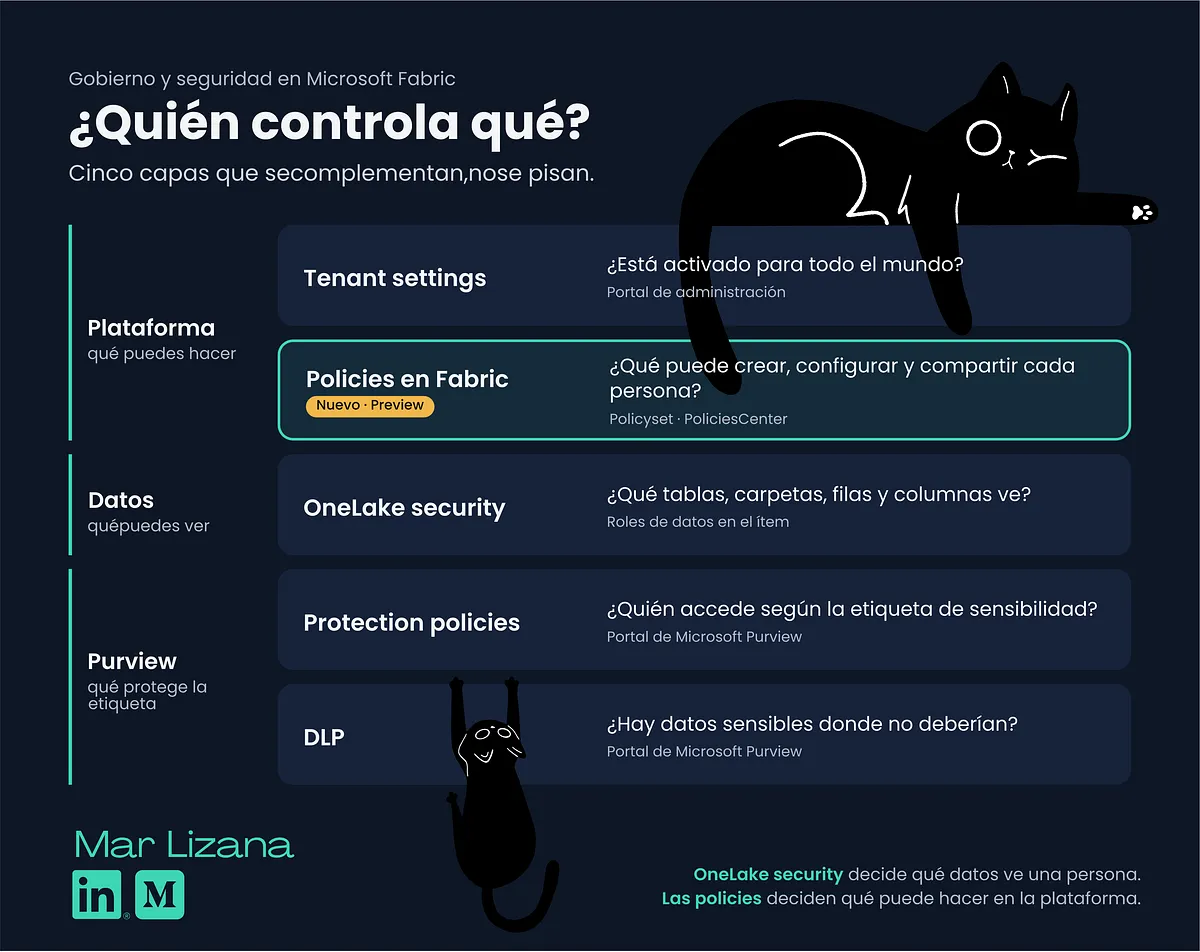 Security and governance layers in Microsoft Fabric: tenant settings, policies, OneLake security, Purview protection policies and DLP
My take
This is a change of approach. For those of us who build Fabric platforms for clients, it fits what I hear most in kickoffs: we want to give teams autonomy, but not an open bar.
That said, it’s in preview. Now it’s time to test it in a sandbox tenant before recommending it to anyone in production.
Which one are you going to try first? See you in the comments.
Sources
- What are Microsoft Fabric policies (preview)?, Microsoft Learn
- Get started with Microsoft Fabric policies, Microsoft Learn
- Item creation policy, Microsoft Learn
- External data sharing policy, Microsoft Learn
- Automate Fabric policy sets with policy-as-code, Microsoft Learn
- Build, deploy, and govern Microsoft Fabric at scale, Kim Manis, Microsoft
- What’s new in Microsoft OneLake (FabCon Barcelona 2026), Dipti Borkar, Microsoft
- FabCon Europe 2026: OneLake Gets More Data and Stronger Governance for AI, Ginger Grant, CODE Magazine
- FabCon and SQLCon 2026 in Barcelona, Arun Ulag, Microsoft
Found it useful? Clap, no account needed. You can clap more than once.
Comments